- Elliot from Ghost Team
- Posts
- 20 minute hack: SEO & AEO pipeline built with Claude Cowork
20 minute hack: SEO & AEO pipeline built with Claude Cowork
Full workflow & live demo included

Elliot Garreffa
March 17, 2026
Hey builders,
Anyone who's done SEO work knows this - the traditional way of working is very labour intensive.
Keyword data. Competitor analysis. Cluster mapping. Content briefs. Writing. Editing. Formatting. With a traditional agency, getting 3-5 SEO-optimised blogs can take weeks.
I'm not exaggerating when I say this: end-to-end research, strategy, and content can now be done in less than 20 minutes. Even if you don't know how to code.
How? Claude Cowork.
Today I'm gonna walk through exactly what called co-work is and how you can build your SEO and AEO capability with it.
Let’s dive in.
Full Demo Video Here:
What is Claude Cowork?
Put simply, it's a clean interface on top of Claude Code - arguably the world's most powerful coding agent - that runs directly on your computer.
That distinction matters. You're not using regular Claude. You're using Claude Code in the backend, which means it can do far more than a standard chat interface. Create files, search the web, chain together multi-step workflows, talk to external tools - all autonomously.
This completely flips on its head how you can do SEO and AEO. Not "AI helps you write faster." The entire workflow - research, strategy, content - done in one session.
The Four Capabilities That Make This Work
So, this is how it actually works under the hood:
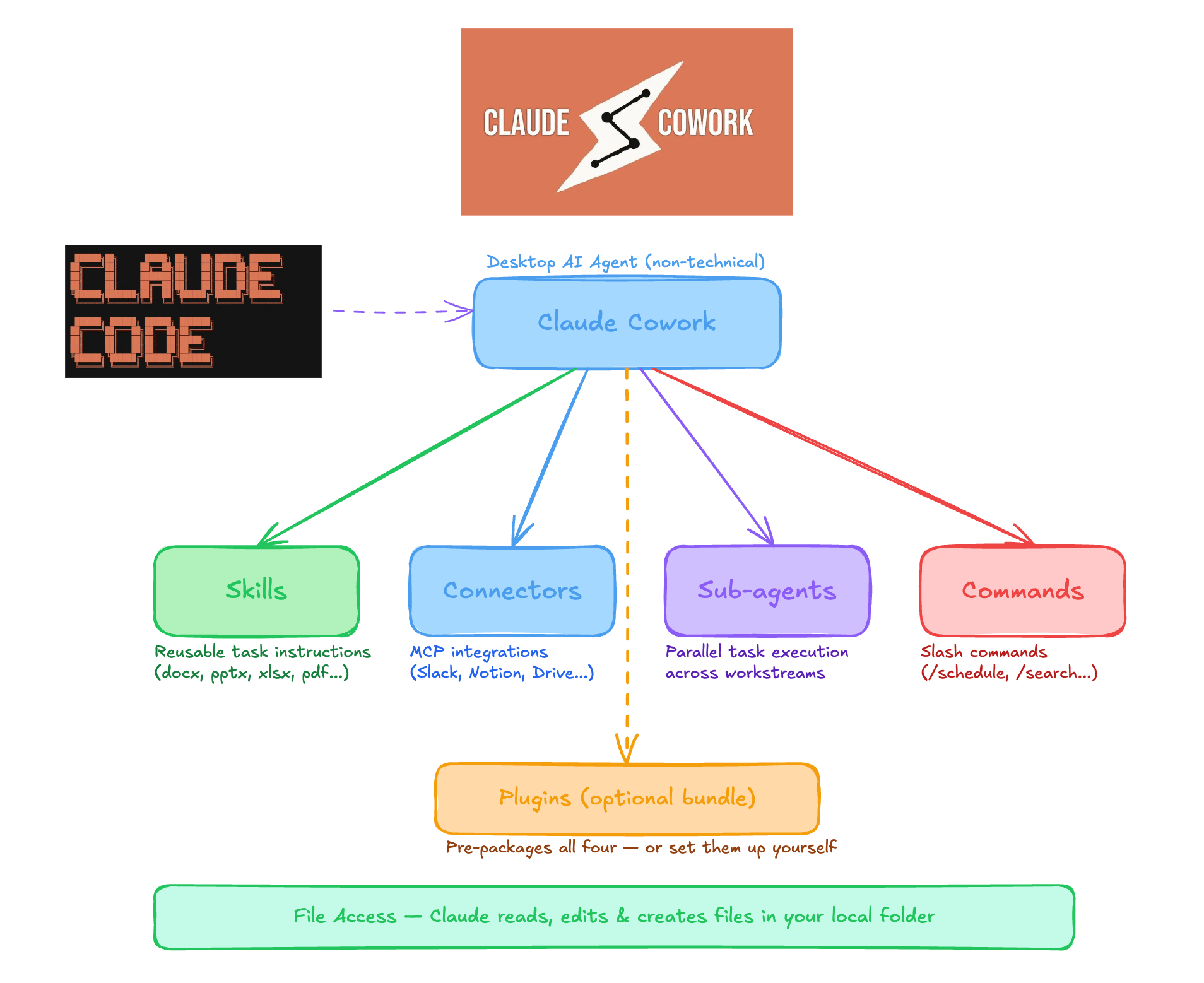
How Claude Cowork Works
Skills
These aren't just prompts. A skill packages together a repeatable workflow plus methodology files, data, and context. I built two: one for keyword research and one for SEO/AEO content creation. They tell Cowork exactly how to analyse data, score keywords, and write articles that rank — every time.Connectors (MCP Apps)
This is where it gets really interesting. Connectors are how Cowork talks to external tools - and they're built on MCP App standard, the same standard that works across ChatGPT, Claude, Cursor, and VS Code.Sub-agents
Cowork delegates to specialised sub-agents that work in their own context window. One handles research. Another writes content. They don't compete for context space - they collaborate. This is why you can run massive workflows that would crash regular Claude.Commands
Want the same workflow on repeat? Create a command. One trigger kicks off the entire chain - skills, connectors, sub-agents, all of it. Daily keyword updates? Automated.
The part to really understand here is that Claude Cowork is going to decide when to use all of these things.
All you do is give your prompt and the objective that you're trying to achieve and it will autonomously decide what skills, connectors, and sub-agents to use to best complete the work.
It's done all autonomously for you.
The Exact Workflow I Ran
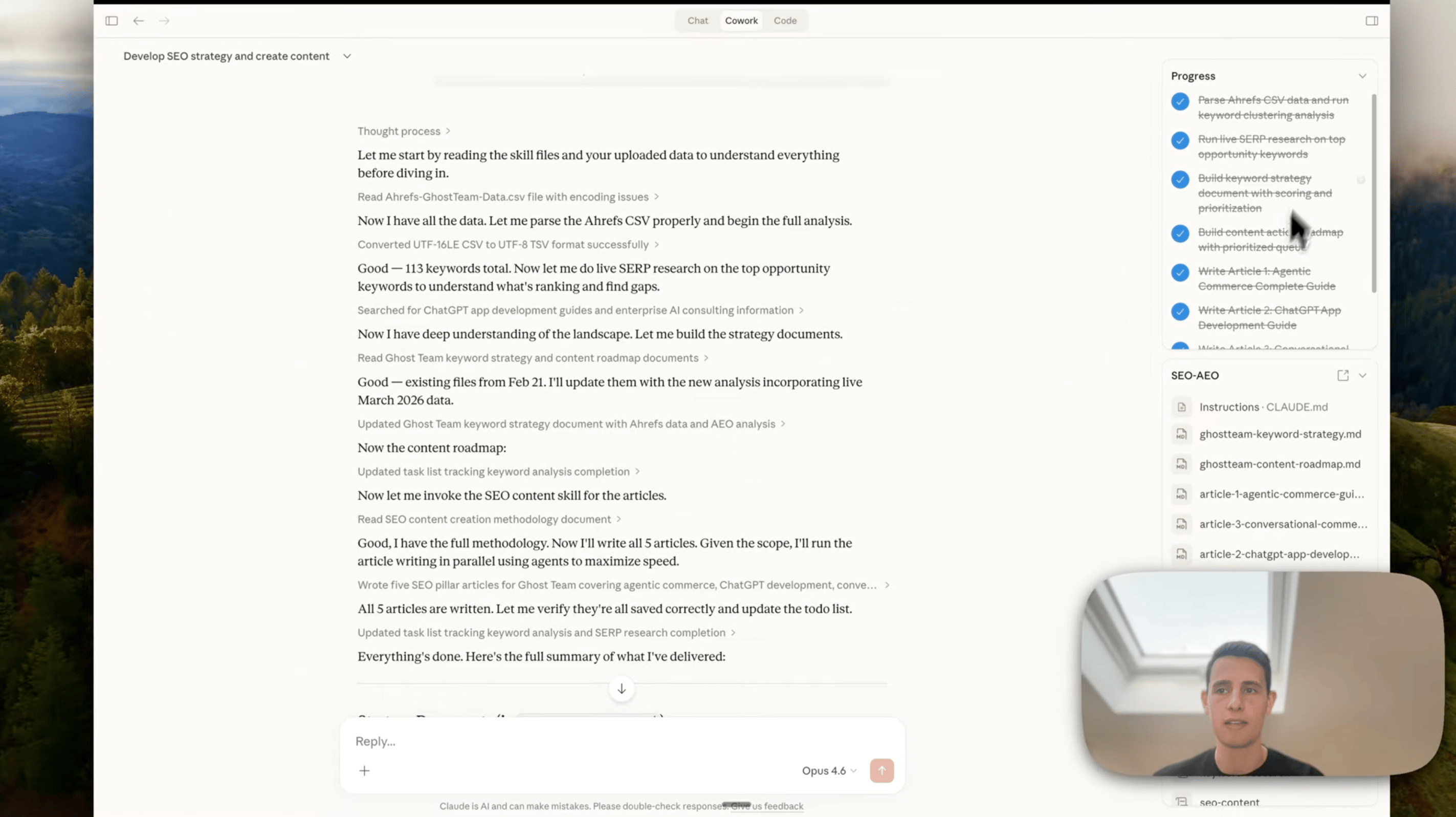
Here's the step-by-step:
→ Connected GA4, Search Console, and Ahrefs data into Cowork
→ Triggered the keyword research skill (full methodology baked in)
→ It mapped clusters, scored opportunities, identified low-difficulty wins
→ Built a 20-article content roadmap - ranked by priority
→ Immediately started writing the first 5 articles using the SEO content creation skill
→ Each article came out with full metadata, FAQs, internal link suggestions, and an AEO checklist
One prompt. Two skills. Twenty minutes.
The strategy identified opportunities like agentic commerce (massive growth keyword), ChatGPT app development guides (low difficulty, zero credible competition), and conversational commerce - then created a smart blend of quick wins and long-term plays automatically.
Doing this was simply not possible before unless you used Claude Code in the terminal. You try this in regular Claude and you hit context window limits instantly.
I would highly recommend giving this a go in Claude Cowork. It's an absolute game-changer for how quickly you can execute through this kind of step-by-step workflow.
Why This Matters for MCP App Builders
Here's the bigger picture.
This workflow highlights exactly why MCP apps are so valuable. People don't just want tools - they want to complete workflows. They want an app to play a role within a larger process and just work.
The apps that are available in Claude, available in ChatGPT - those are the ones that get picked up and become part of these future workflows where people are actually getting work done. Ahrefs' MCP connector showed up in my workflow because it was there.
If your app isn't present in these environments, it's not part of the workflow. Simple as that.
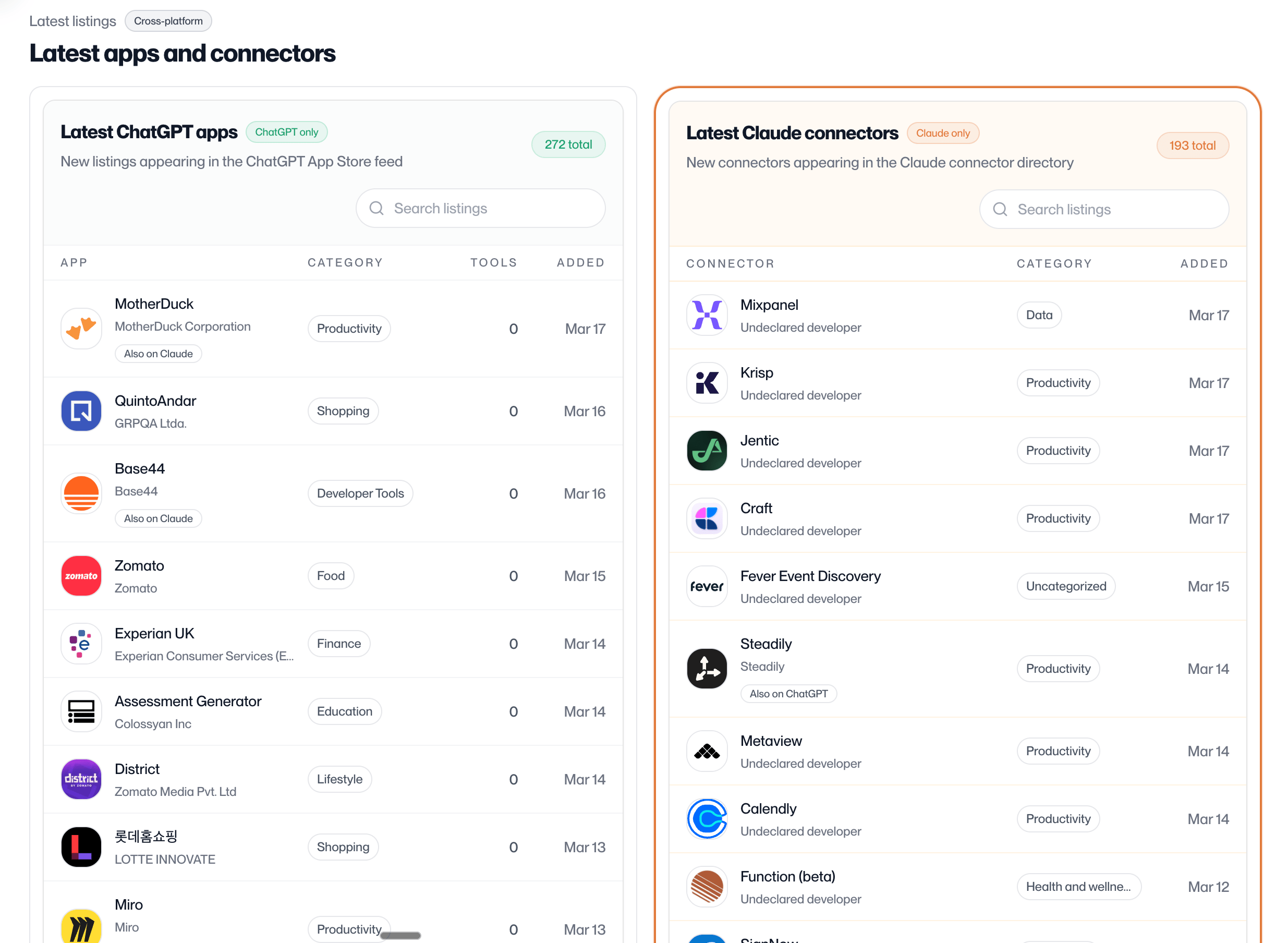
You can track which brands have already launched Claude Connectors at track.appdiscoverability.com
Happy building!
→ Full guide: I wrote a complete end-to-end walkthrough with exact prompts, skills, and folder structure — read it here (https://www.ghostteam.ai/resources/how-to-do-seo-and-aeo-with-claude-cowork-full-workflow)
→ Fully autonomous setup: You can take this a step further. I’m currently running this entire SEO and AEO workflow autonomously through my OpenClaw setup - connected directly to my CMS so it can publish automatically. I'll be sharing that setup very soon.
If you're still doing SEO manually, or paying an agency thousands for keyword research and content that takes weeks - I’d highly recommend you explore this. And it's only getting more powerful.
Shout if you have any questions!
Elliot
If you want help building your MCP app or figuring out your cross-platform distribution strategy, book a strategy call with our team at Ghost Team.
We've been in this space since day one.